Friday, 8 May 2015

Google's New Interface: Just Tell It What To Do

Google used to tell you how to do something. Now, it’ll just do it for you.

In the last week, the company has added two small but important features to their famous search bar. You can type "find my phone" and Google will locate it on a map (and offer to call it); you can also type "send directions" and an interface will appear to beam directions to your phone.

No, neither of these functions is going to change the world overnight—especially as you’ll need an Android phone connected to your Google account for them to appear. But when you place them next to previously added mobile features—like being able to ID a song, set an alarm, or create a reminder using the search bar—and look at them in the context of the last 16 years of Google search, it feels a lot more like the evolution of search interface than a pair of random features.


For more...

Friday, 24 April 2015

Microsoft Invents A Better Way To Sense Hand Gestures

HANDPOSE PROMISES THE HOLY GRAIL OF MOTION DETECTION: FAST, ACCURATE HAND RECOGNITION.

Imagine strapping on a virtual reality headset, then using your hands to pick up a sword and swing it around your head. Imagine a hazard team able to defuse a complicated bomb from a mile away, just by controlling a robot's hand as effortlessly as your own. Imagine painting a picture on your computer just by waving a brush in front of your screen. Or, if you prefer, imagine using a computer like in Minority Report, whisking away pages and files just by grabbing them with your hands. 


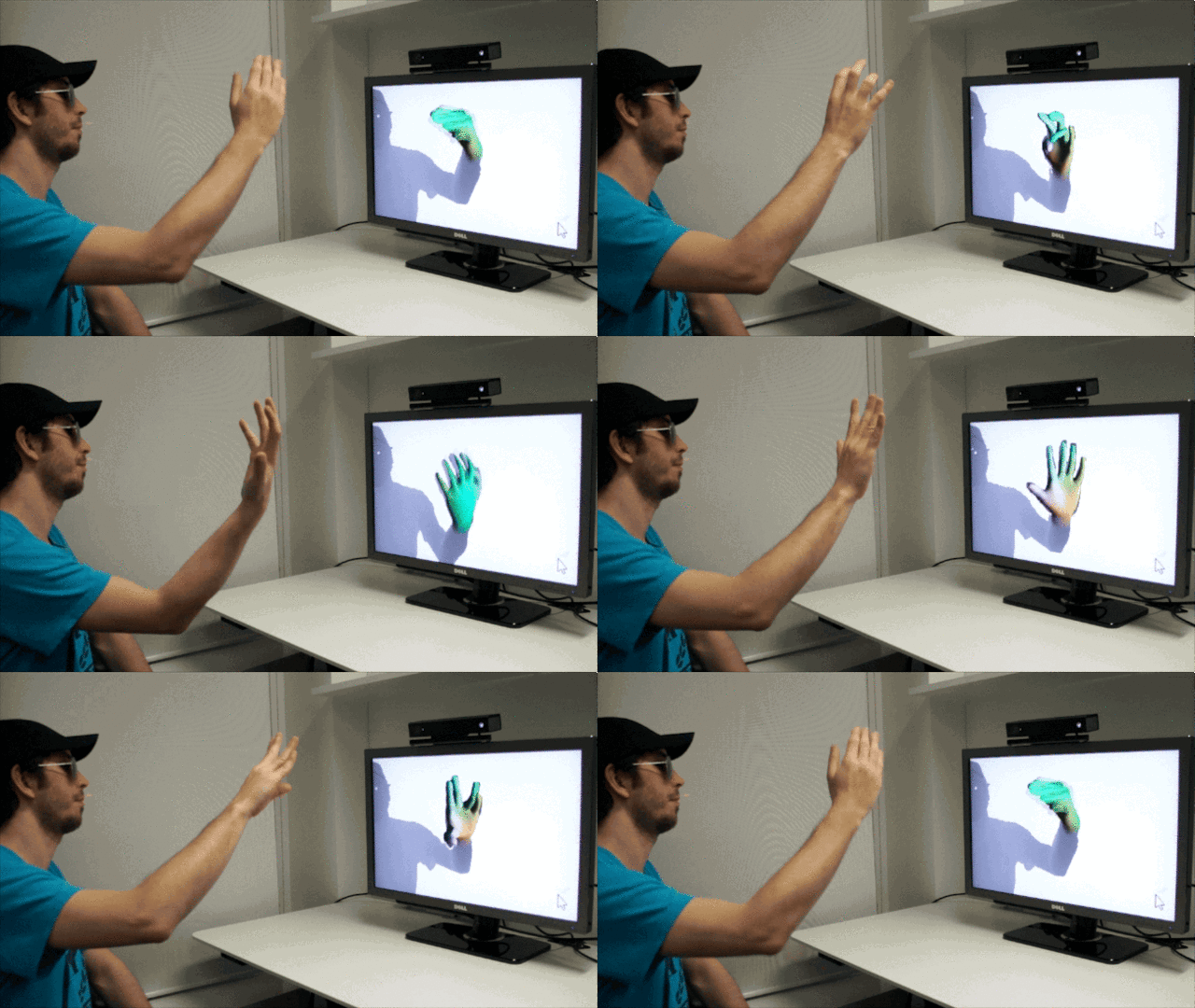
Using the Handpose software, the first thing a user does is scan his or her hand by holding it up in front of the Kinect to create a 3-D model. In the lab, the process currently takes about a second, which is less than it takes an iPhone Touch ID sensor to accurately measure your fingerprint. Once the system has created a 3-D model of your hand, Handpose allows you to control it on the screen in real-time, at around 30 frames per second. From there, you can use the on-screen hand as if it was a doppelganger of your own.

Friday, 17 April 2015

More Control over Text Decoration

Text can have multiple decorations

a {
  text-decoration: underline overline;
}


See the text-decoration entry in the Almanac. More specifically, this is adding multiple values to the text-decoration-line subproperty.

You can change the color of the decoration

The default for the color of the decoration lines is the same as the color of the text. But you can change that:

a {
  text-decoration-color: #f06d06;
}


Check out the text-decoration-color entry in the Almanac.

a {
  text-decoration-style: wavy;
}


Friday, 27 March 2015

Left Half and Right Half Layout

Imagine a scenario where you need to split a layout in half. Content on the left and content on the right. Basically two equal height columns are needed inside of a container. Each side takes up exactly half of the container, creating a distinct break between one. Like many things in CSS, there are a number of ways to go about this and we're going to go over many of them right now!

Using Background Gradient


.container {
  background: linear-gradient(
    to right, 
    #ff9e2c 0%, 
    #ff9e2c 50%, 
    #b6701e 50%, 
    #b6701e 100%
  );
}


Using Absolute Positioning


Another route might be to set up two containers inside of a parent container, position them absolutely, split them up in halves using percentages, then apply the backgrounds. The benefit here is that now we have two separate containers that can hold their own content.


Absolute positioning is sometimes a perfectl solution, and sometimes untenable. The parent container here will need to have a set height, and setting heights is often bad news for content (content changes!). Not to mention absolute positioned elements are out of the document flow. So it would be hard to get this to work while, say, pushing down other content below it.

Using (fake) Tables


Yeah, yeah, tables are so old school (not to mention fraught with accessibility issues and layout inflexibility). Well, using the display: table-cell;property can actually be a handy way to create this layout without writing table markup in HTML. In short, we turn our semantic parent container into a table, then the child containers into cells inside the table — all in CSS!


You could even change the display properties at breakpoints pretty easily here, making the sides stack on smaller screens. display: table; (and friends) is supported as far back as IE 8 and even old Android, so it's pretty safe!

Using Floats

We can use our good friend the float to arrange the containers beside each other. The benefit here is that it avoids absolute positioning (which as we noted, can be messy).

Using Inline-Block

If clearing elements after floats seems like a burden, then using display: inline-block is another option. The trick here is to make sure that the elements for the individual sides have no breaks or whitespace in between them in the HTML. Otherwise, that space will be rendered as a literal space and the second half will break and fall down.

Using Flexbox


Friday, 13 March 2015

em-based media queries use

It’s not a disadvantage. EM units at the media-query level are not affected by html-scale because they refer to the medium: i.e. device-scale (outside the html). You can set html font-size in EMs too, which is logically consistent. User-set device-scale just means you can’t assume a PX value for anything in your design unless you specifically size it in PX (and even then often not); and that best policy is to set html font-size in EM or %, which is relative to device-scale, and then set anything inside the html scope in REMs, which is relative to html-scale. This forms a relative-size chain: nothing breaks, user/device-scale can be anything, and HTML font-size can be anything, media queries always trigger where they should.

If we’re going to be proportional…


A core tenet of Responsive Web Design (RWD) is fluidity and proportion. Instead of using fixed-width layouts, we enlightened web devs and designers use percentages in our CSS. Font units aren’t pixels or points anymore, they’re percentages (typically for top-level baseline reset) or, more often, ems. And yet the vast majority of us still write width-based media queries in pixels, e.g.:

@media all and (min-width: 500px) {}

@media screen and (max-width: 800px) {}

It’s a natural thought process: for windows or screens of particular width ranges, we want to flow our content in a particular way. This naturally seems like a pixel dimension. But, once again, to bring out my big hammer, what about when we look at things from a content perspective?

Folks who design for traditional reading media—where the content really is king—don’t center design decisions around the absolute width of content-holding elements so much as around the optimal line lengths for the content they’re flowing. There are some tried-and-true numbers one can shoot for that make for the “right” number of letters (and thus words) per line for comfortable human reading.

Thus actual column width is a function of font size and ems-per-line.

Baseline expectations...

You may have seen the rule of thumb (useful, admittedly!) that makes the following general equation in terms of baseline font sizes in CSS:

100% = 1 em ~= 16px ~= 14pt

This means that, at your baseline, that is, before you’ve adjust font sizes in any child elements, the default font size in the browser is usually approximately 16px and usually approximately 14pt but always 100% and 1em.

If we start from a baseline of 16px, you may well wonder what the difference (beyond academic) is between a media query like:

@media all and (min-width: 400px)

and one like this, that uses ems multiplied against the 16px baseline approximation:

@media all and (min-width: 25em)

Friday, 20 February 2015

How to Name a Business

What's in a name? A lot, when it comes to small-business success. The right name can make your company the talk of the town. The wrong one can doom it to obscurity and failure. Ideally, your name should convey the expertise, value and uniqueness of the product or service you have developed.

Some experts believe that the best names are abstract, a blank slate upon which to create an image. Others think that names should be informative so customers know immediately what your business is. Some believe that coined names (that come from made-up words) are more memorable than names that use real words. Others think they're forgettable.


Enlist Expert Help to Start


Coming up with a good business name can be a complicated process. You might consider consulting an expert, especially if you're in a field in which your company name may influence the success of your business. Naming firms have elaborate systems for creating new names and they know their way around the trademark laws. They can advise you against bad name choices and explain why others are good.

The downside is cost. A professional naming firm may charge as much as $80,000 to develop a name. That generally includes other identity work and graphic design as part of the package, according to Laurel Sutton, a principal with Catchword Brand Name Development. Naming services that charge as little as $50 do exist, but spending a reasonable amount of money early for quality expert advice can save you money in the long term.

What's in a Name?


Start by deciding what you want your name to communicate. It should reinforce the key elements of your business. Your work in developing a niche and a mission statement will help you pinpoint the elements you want to emphasize in your name.

The more your name communicates to consumers about your business, the less effort you must exert to explain it. According to naming experts, entrepreneurs should give priority to real words or combinations of words over fabricated words. People prefer words they can relate to and understand. That's why professional namers universally condemn strings of numbers or initials as a bad choice.

When choosing a business name, keep the following tips in mind:

Choose a name that appeals not only to you but also to the kind of customers you are trying to attract.

  • Choose a comforting or familiar name that conjures up pleasant memories so customers respond to your business on an emotional level.
  • Don't pick a name that is long or confusing.
  • Stay away from cute puns that only you understand.
  • Don't use the word “Inc.” after your name unless your company is actually incorporated.

Get Creative


Coined names can be more meaningful than existing words, says NameLab president Michael Barr. For example, "Acura" has no dictionary definition but the word suggests precision engineering, just as the company intended. NameLab's team created the name Acura from "Acu," a word segment that means "precise" in many languages. By working with meaningful word segments (what linguists call morphemes) like "Acu," Barr says the company produces new words that are both meaningful and unique.

Barr admits, however, that made-up words aren't the right solution for every situation. New words are complex and may create a perception that the product, service or company is complex, which may not be true. Plus, naming beginners might find this sort of coining beyond their capabilities.

An easier solution is to use new forms or spellings of existing words. For instance, NameLab created the name Compaq when a new computer company came to them touting its new portable computer. The team thought about the word "compact" and came up with Compaq, which they believed would be less generic and more noticeable.

Test Your Name


After you've narrowed the field to four or five names that are memorable and expressive, you are ready to do a trademark search. Not every business name needs to be trademarked, as long as your state government gives you the go-ahead and you aren't infringing on anyone else's trade name. But you should consider hiring a trademark attorney or at least a trademark search firm before to make sure your new name doesn't infringe on another business's trademark.

To illustrate the risk you run if you step on an existing trademark, consider this: You own a new manufacturing business that is about to ship its first orders when an obscure company in Ogunquit, Maine, considers the name of your business an infringement on their trademark. It engages you in a legal battle that bankrupts your business. This could have been avoided if sought out expert help. The extra money you spend now could save you countless hassles and expenses further down the road.

Final Analysis


If you're lucky, you'll end up with three to five names that pass all your tests. Now, how do you make your final decision?

Recall all your initial criteria. Which name best fits your objectives? Which name most accurately describes the company you have in mind?

Some entrepreneurs arrive at a final decision by going with their gut or by doing consumer research or testing with focus groups to see how the names are perceived. You can doodle an idea of what each name will look like on a sign or on business stationery. Read each name aloud, paying attention to the way it sounds if you foresee radio advertising or telemarketing in your future. Use any or all of these criteria.

Keep in mind that professional naming firms devote anywhere from six weeks to six months to the naming process. You probably won't have that much time, but plan to spend at least a few weeks on selecting a name.

Once your decision is made, start building your enthusiasm for the new name immediately. Your name is your first step toward building a strong company identity, one that should last as long as you're in business.

Friday, 13 February 2015

Anti-lock braking system for motorcycles

The Motorcycle Anti-lock Brake System (ABS) prevents the wheels of a powered two wheeler from locking during braking situations. Based on information from wheel speed sensors the ABS unit adjusts the pressure of the brake fluid in order to keep traction and avoid fall downs (e.g. maintain deceleration). Motorcycle ABS helps the rider to maintain stability during braking and to decrease the stopping distance. It provides traction even on low friction surfaces. While older ABS models are derived from cars, recent ABS are the result of research, oriented on the specifics of motorcycles in case of size, weight and functionality. The next step will be a supportive system when braking during cornering. National and international organizations evaluate Motorcycle ABS as an important factor to increase safety and reduce motorcycle accident numbers. The European Commission passed legislation in 2012 that made the fitment with ABS for all new motorcycles above 125cc to be mandatory from 1 January 2016.

What ABS adds to motorcycle braking.

As any rider knows, stopping a motorcycle isn't as simple as stopping a car. Most bikes have separate brake controls for the front and rear wheels, and either wheel can lock up during hard braking. On a car, a lockup might result in a skid. On a motorcycle, it often means a serious fall.

No matter how skilled a rider you are, you can't predict when a driver ahead of you will cut you off, forcing you to brake hard. Road surfaces can be unexpectedly sandy or more slippery than they look.

With ABS, riders can brake fully without fear of locking up. Antilocks automatically reduce brake pressure when a lockup is about to occur and increase it again after traction is restored.

More than 4,000 people died in motorcycle crashes in 2011. It makes sense to cut your risk with ABS.